 Screenshots Clipboard
How do I save design references from any website?
Inspiration ends up as half-page captures in Downloads, and the one with the good pricing table is never where you look.
Screenshots Clipboard is a Chrome and Edge extension that captures whole pages, with a sticky header shown once, and keeps them in colour folders you can search. Free, or Plus for $2.99 a month or $19 a year.
Beta. Coming soon to the Chrome Web Store and Microsoft Edge Add-ons.

How it works
Capture the whole page
Click Full page for the page top to bottom, or Area for just the part you like.
File it in a folder
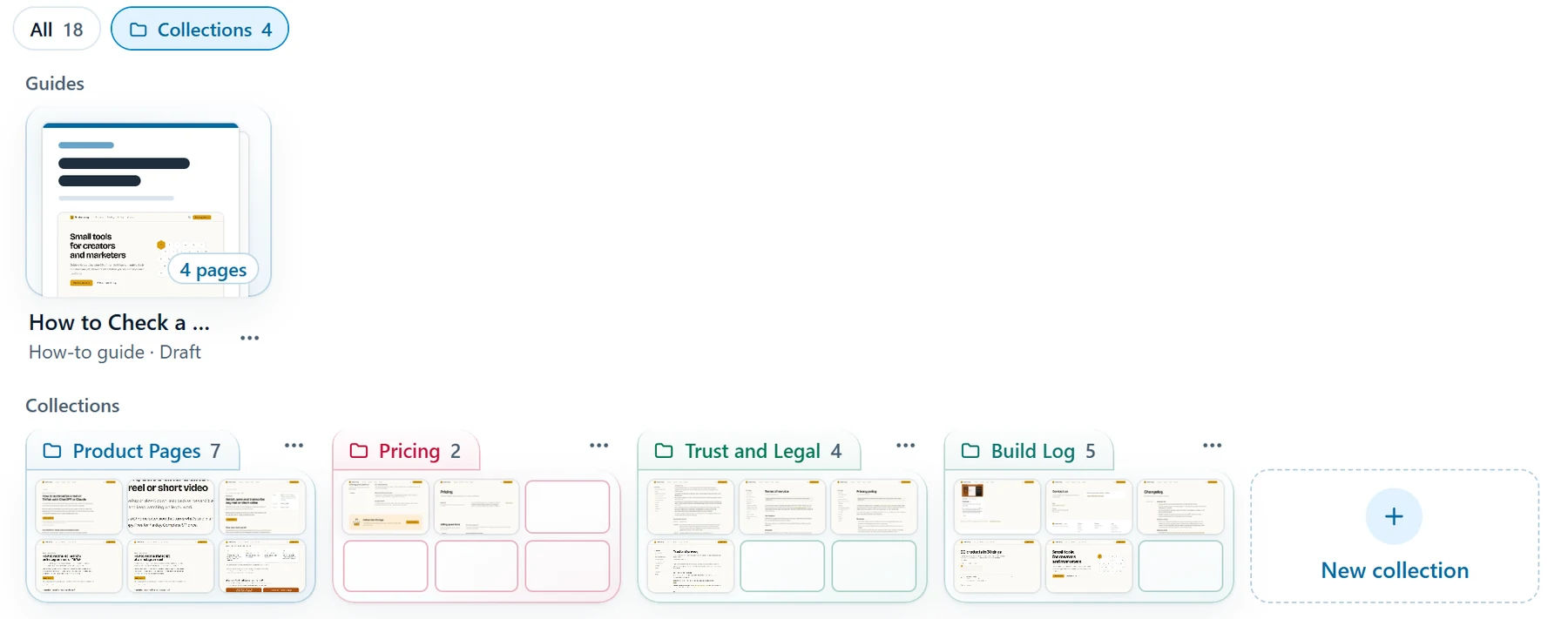
Drag a shot onto a folder. Each collection is a glass folder in its own colour, and search finds shots by title or site.
Mark it up and share
Point at what you like with numbers and arrows in Edit, then paste a set into Notion or a doc in one go. With Plus, the Design feedback template turns each number into a pin with a comment.
What it can’t do
It captures web pages in your browser, not mobile apps. For screens from apps you don’t use, a library like Mobbin is the better pick.
Questions about Screenshots Clipboard
How is this different from Mobbin?
Mobbin is a ready-made library of app screens, with Pro at $120 a year. This is your own library, from any web page you open, kept on your computer, free or $19 a year for Plus.
Does it keep the sticky header once on long pages?
Yes. Full page shows a sticky header once, at the top, instead of on every screen of the page.